 Wing FTP Server

 English
 Deutsch
 简体中文
简体中文Hi
Sorry can't find out why the uploads to my FTP-Server (8.2.4) reports as "complete" but the received pictures are corrupt. Is there a way to increase the detail level of the log? Not sure where the problem is but for the moment I have no idea why this happen. I have not set any restrcition for the users.
Thanks, regards
Renato
[04] Tue, 08 Sep 2026 08:14:55 (0000007) 150 Opening BINARY mode data connection for file transfer.
[04] Tue, 08 Sep 2026 08:14:55 (0000007) 226 File received ok. Transferred:540672Bytes;Average speed is:4631.579KB/s
[03] Tue, 08 Sep 2026 08:14:55 (0000007) MFMT 20260907200834 /E-LW/Downloads/eBike/eBike_20230117_202426.jpg
[04] Tue, 08 Sep 2026 08:14:55 (0000007) 213 Modify=20260907200834; /E-LW/Downloads/eBike/eBike_20230117_202426.jpg
[03] Tue, 08 Sep 2026 08:14:55 (0000007) PASV
[04] Tue, 08 Sep 2026 08:14:55 (0000007) 227 Entering Passive Mode (192,168,0,2,195,81)
[03] Tue, 08 Sep 2026 08:14:55 (0000007) STOR PXL_20260907_165720260.jpg
[04] Tue, 08 Sep 2026 08:14:55 (0000007) 150 Opening BINARY mode data connection for file transfer.
[04] Tue, 08 Sep 2026 08:14:55 (0000007) 226 File received ok. Transferred:1589248Bytes;Average speed is:6334.694KB/s
[03] Tue, 08 Sep 2026 08:14:55 (0000007) MFMT 20260907165721 /E-LW/Downloads/eBike/PXL_20260907_165720260.jpg
[04] Tue, 08 Sep 2026 08:14:55 (0000007) 213 Modify=20260907165721; /E-LW/Downloads/eBike/PXL_20260907_165720260.jpg
[03] Tue, 08 Sep 2026 08:14:55 (0000007) PASV
[04] Tue, 08 Sep 2026 08:14:55 (0000007) 227 Entering Passive Mode (192,168,0,2,195,82)
[03] Tue, 08 Sep 2026 08:14:55 (0000007) STOR PXL_20260907_165715565.jpg
[04] Tue, 08 Sep 2026 08:14:55 (0000007) 150 Opening BINARY mode data connection for file transfer.
[04] Tue, 08 Sep 2026 08:14:56 (0000007) 226 File received ok. Transferred:753664Bytes;Average speed is:4205.714KB/s
[03] Tue, 08 Sep 2026 08:14:56 (0000007) MFMT 20260907165717 /E-LW/Downloads/eBike/PXL_20260907_165715565.jpg
[04] Tue, 08 Sep 2026 08:14:56 (0000007) 213 Modify=20260907165717; /E-LW/Downloads/eBike/PXL_20260907_165715565.jpg
FTP upload error
-
Mucciarelli
- Posts: 6
- Joined: Tue Sep 08, 2026 6:22 am
Re: FTP upload error
ok done some more tests. On my mobile (android) I use Total commander with ftp/sftp-plugin and today I have installed ftp rush. Same problems with uploaded files some are complete the others not. I never had those problems with my "old" ftp-software, no idea where the problem is. The Settings on my server are more or less "default".
-
FTP
- Site Admin
- Posts: 2184
- Joined: Tue Sep 29, 2009 6:09 am
Re: FTP upload error
OK, we have tested Total Commander FTP transfer with the latest version 8.2.5, all the uploaded images are fine. Perhaps the issue you mentioned was caused by the phone system or the network environment (Android phones frequently suspend background network plugins or throttle background processing after a few seconds).
-
Mucciarelli
- Posts: 6
- Joined: Tue Sep 08, 2026 6:22 am
Re: FTP upload error
Thanks for the reply, and sorry for the "missing" feedback. I have today done some tests with a laptop and never had any issue, latest FTPServer version 8.2.5 with Windows 11 26H2. Tried also the "SFV" function and indeed this is cool. Only miss the option to set the "SFV" to a folder and all subfolder (that would be great).
I have not finish my tests 100%, and yes it is something on my side. Tested it now again with two picture from my mobile (Android 17) with latest Total commander and the uploaded two pictures are again not complet uploaded. The software reported me as uploaded abd also the ftp server say "File received ok" ..... hmm at the moment I have no idea... will test it further tomorrow.
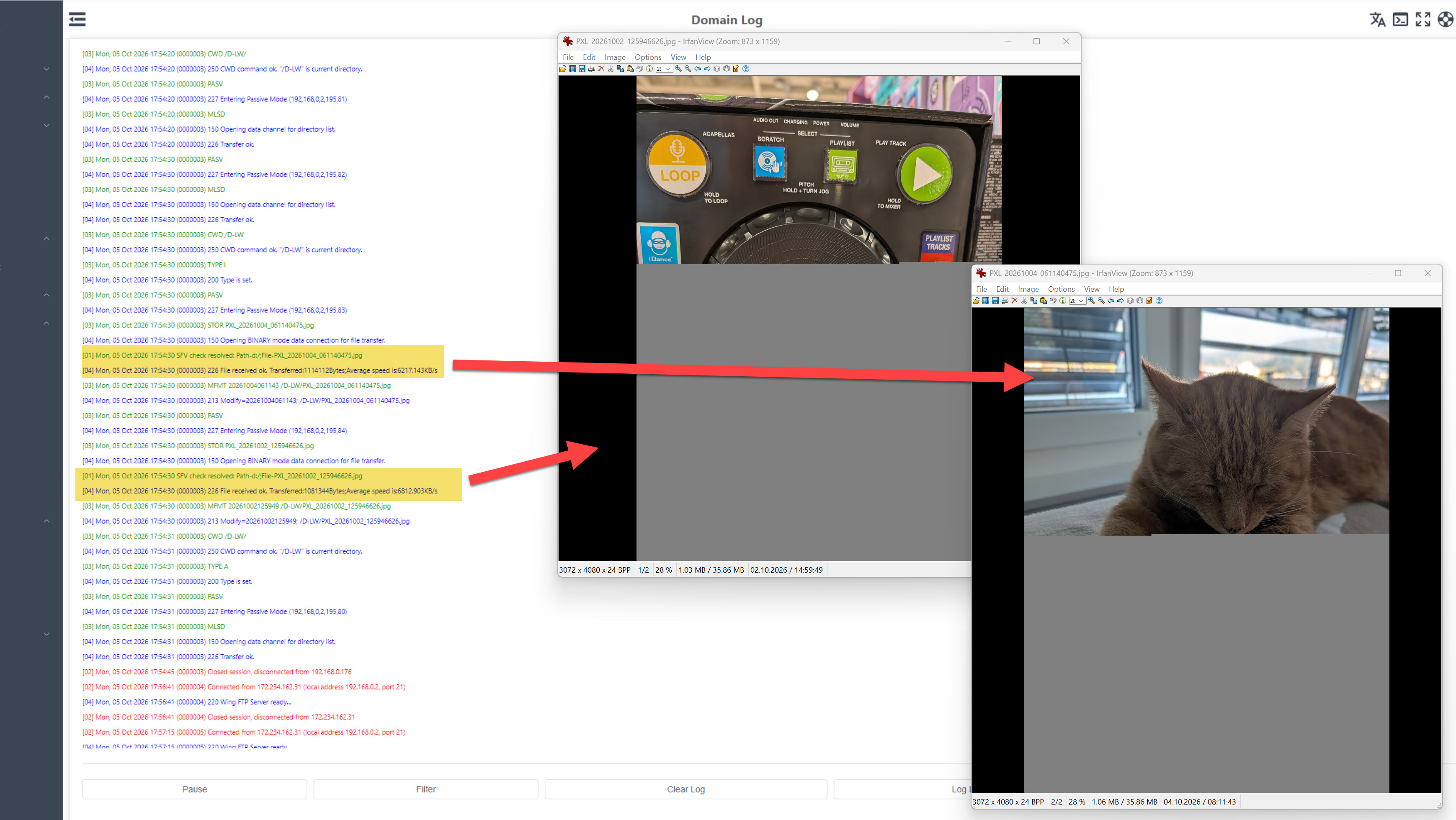
I have not finish my tests 100%, and yes it is something on my side. Tested it now again with two picture from my mobile (Android 17) with latest Total commander and the uploaded two pictures are again not complet uploaded. The software reported me as uploaded abd also the ftp server say "File received ok" ..... hmm at the moment I have no idea... will test it further tomorrow.
-
Mucciarelli
- Posts: 6
- Joined: Tue Sep 08, 2026 6:22 am
Re: FTP upload error
Ok seems that I have misunderstand the line "226 File received ok. Transferred:205Bytes;Average speed is:15.400KB/s". It is not the total size of the file, it is the amount of data received. Ok got it. Those corrupt files are not complete sended indeed from the mobile.
In the meantime I have done more tests with my mobile, sometimes the files are uploaded correct sometimes not. Not have an answer for that yet, but I will find it out myself ;-) I think it is solved for you.
I have tested the SFV function. Indeed a really nice feature to check uploaded files. Some questions to this function:
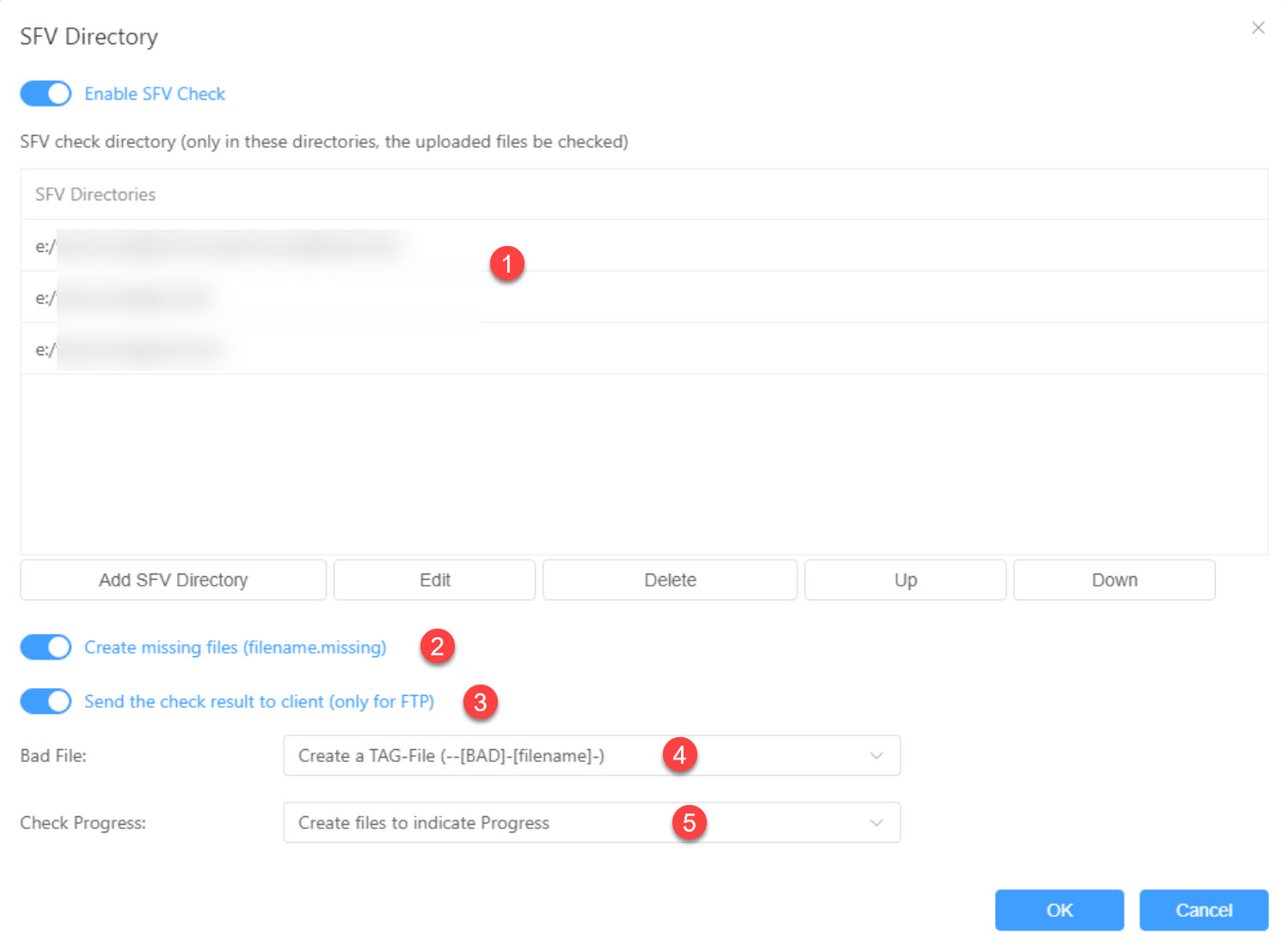
Number 1: As already mentioned it would be nice to add the "recursive subfolder" function to a folder. As I have an upload folder user can create subfolder and then it does not work as it is not in the list to do a svf-check to uploaded files ;-)
Number 2: Not sure what this is for, as I have uploaded a txt-file with a wrong crc. The file is there but with a wrong checksum. Is it only created when the file is missing?
Number 3: Yep does work, see it in the client (great).
Number 4: The wrong txt-file I have uploaded -> no TAG-File is created
Number 5: ok, I have only enabled it to see anything. I do not see a result really, which file has a wrong crc....
Why is the crc-file itself also counted as file? in the crc-file are only 4 entries, why does it report "3 of 5" ?
In the meantime I have done more tests with my mobile, sometimes the files are uploaded correct sometimes not. Not have an answer for that yet, but I will find it out myself ;-) I think it is solved for you.
I have tested the SFV function. Indeed a really nice feature to check uploaded files. Some questions to this function:
Number 1: As already mentioned it would be nice to add the "recursive subfolder" function to a folder. As I have an upload folder user can create subfolder and then it does not work as it is not in the list to do a svf-check to uploaded files ;-)
Number 2: Not sure what this is for, as I have uploaded a txt-file with a wrong crc. The file is there but with a wrong checksum. Is it only created when the file is missing?
Number 3: Yep does work, see it in the client (great).
Number 4: The wrong txt-file I have uploaded -> no TAG-File is created
Number 5: ok, I have only enabled it to see anything. I do not see a result really, which file has a wrong crc....
Why is the crc-file itself also counted as file? in the crc-file are only 4 entries, why does it report "3 of 5" ?
-
Mucciarelli
- Posts: 6
- Joined: Tue Sep 08, 2026 6:22 am
Re: FTP upload error
Part 2 (sorry for the delay but this board has time restrictions):
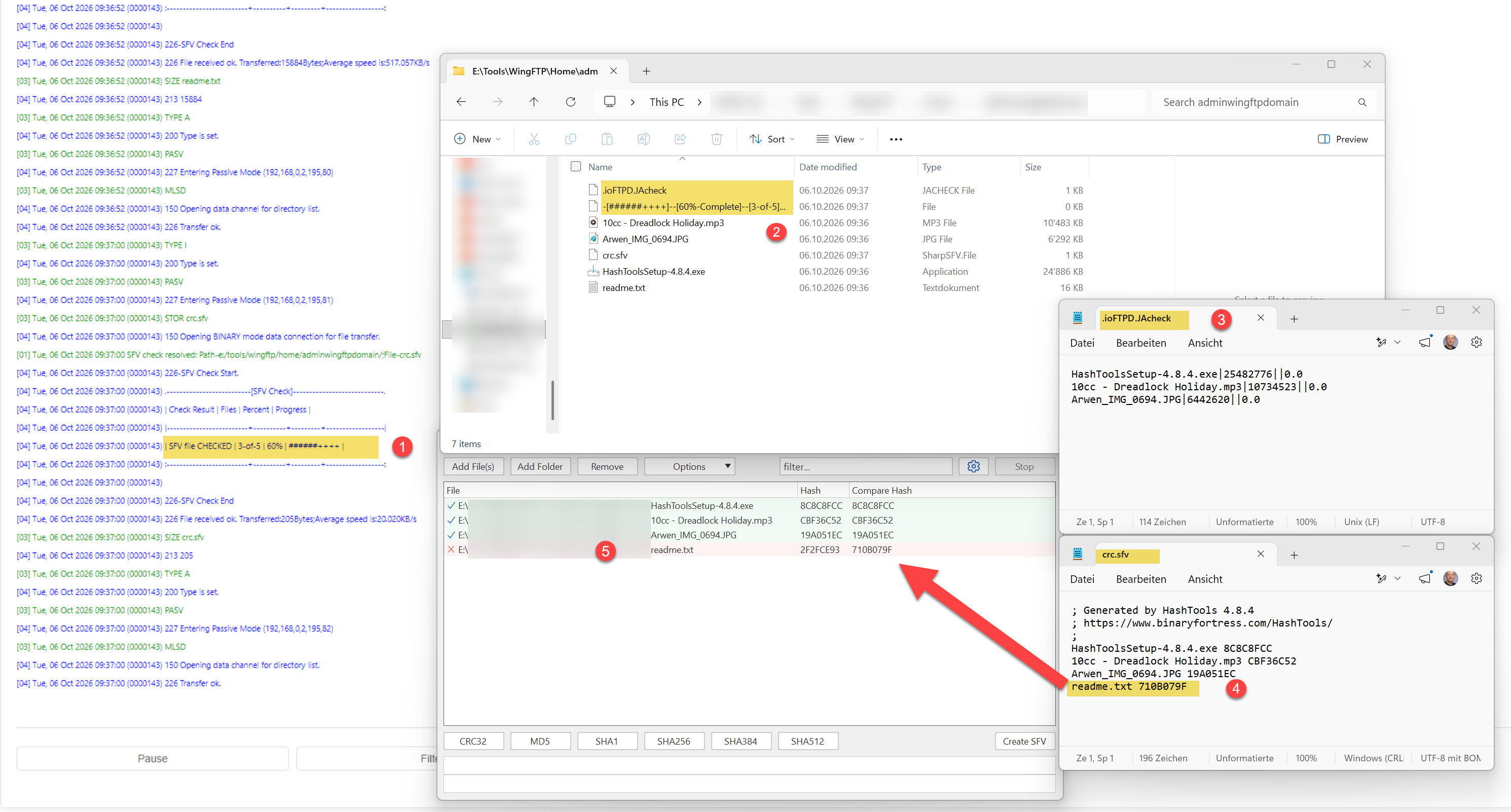
Number 1: also the crc-file is counted. And is it right that the user should upload all files first and afterwards the crc-file?
Number 2: temporary files. If the same folder is used for different stuff -> those files are overwritten?
Number 3: found 3 files and those crc are ok. One File had a wrong crc -> it is not listen there. In case it is not uploaded "readme.txt.missing" was created (ok good)
Number 4: in the CRC-files are 4 files with their checksums
Number 5: Checked the files, yep 1 file is "corrupt"
Number 1: also the crc-file is counted. And is it right that the user should upload all files first and afterwards the crc-file?
Number 2: temporary files. If the same folder is used for different stuff -> those files are overwritten?
Number 3: found 3 files and those crc are ok. One File had a wrong crc -> it is not listen there. In case it is not uploaded "readme.txt.missing" was created (ok good)
Number 4: in the CRC-files are 4 files with their checksums
Number 5: Checked the files, yep 1 file is "corrupt"
-
Mucciarelli
- Posts: 6
- Joined: Tue Sep 08, 2026 6:22 am
Re: FTP upload error
Why those SFV-checks not write to a log-file based on the name of the .sfv-file? (would be easier to find the info in one place than check all files/folder and their content ;-) )
Example:
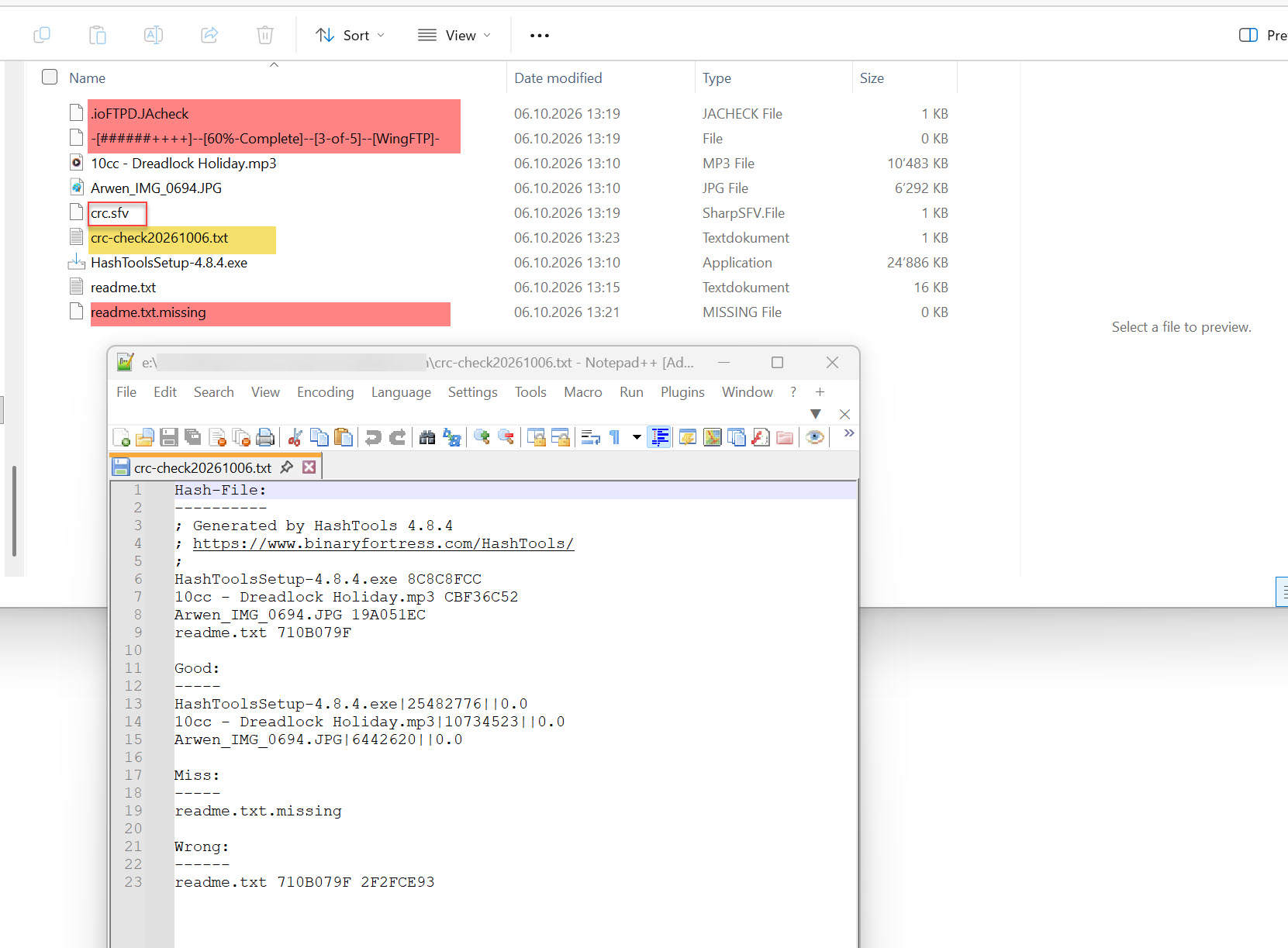
Example: